Reset logic
WorkflowAutoAssembler Reset Logic
This notebook documents how reset logic works in Workflow Auto Assembler after the planner generates an initial workflow. The focus is on the control flow, what triggers retries, and which component is rerun in each case.
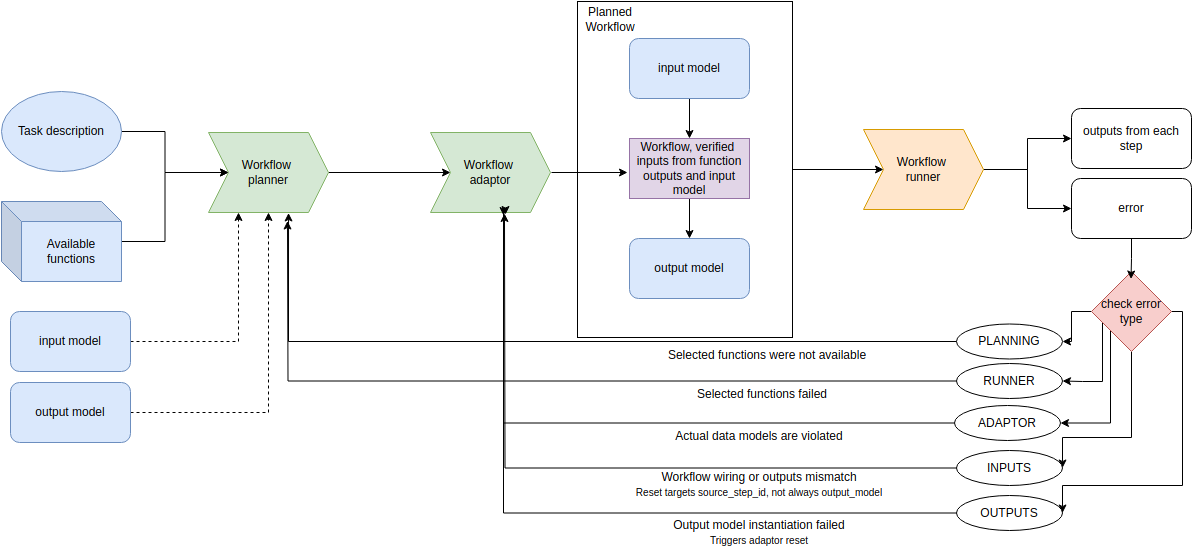
High-Level Loop
After the planner produces an initial workflow, the system iterates through a planning loop. Each loop can rerun the planner, the adaptor, or both depending on the last error encountered during testing.
Components Involved
- WorkflowPlanner generates a candidate workflow (function list with arguments).
- WorkflowAdaptor adapts arguments to match available function schemas and input/output models.
- WorkflowRunner executes the workflow using test inputs and compares outputs.
- WorkflowAutoAssembler updates reset logic based on errors and decides what to rerun.
Reset Decision Table
The reset logic is driven by the most recent error type from the test run. The table below summarizes what happens next.
| Error Type | What Happened | Next Action |
|---|---|---|
| RUNNER | Function execution failed | Rerun planner and adaptor |
| PLANNING_HF | Planner used unavailable functions | Rerun planner and adaptor |
| PLANNING_MISSOUTPUT | Planner omitted output_model | Planner rerun with prompt fix |
| PLANNING_OUTPUT_MODEL | output_model args missing | Planner rerun with prompt fix |
| OUTPUTS_UNEXPECTED | Output mismatch vs expected | Adaptor rerun (prefer output_model); early planner reset if same output fields repeat |
| OUTPUTS_FAILURE | output_model instantiation failed | Adaptor rerun |
| ADAPTOR_JSON | Adaptor produced invalid mapping | Adaptor rerun |
What Happens After Initial Planning
- Planner returns a workflow.
- Adaptor maps inputs for each step to actual references.
- Runner executes the workflow on test inputs.
- Outputs are compared to expected values.
- Reset logic decides whether to rerun planner, adaptor, or stop.
OUTPUTS_UNEXPECTED: How the Failing Step Is Chosen
When outputs differ from expected, the comparer records the source step responsible for each diff and the failing output fields.
The reset logic now prefers re-adapting the output_model step first when OUTPUTS_UNEXPECTED occurs, because many mismatches are fixed by rewiring output_model mappings rather than changing upstream steps. If the workflow has no output_model step, then the reset falls back to the first failing step id.
Output Model Step and Adaptor Resets
If output_model instantiation fails, the error is marked as OUTPUTS_FAILURE. The reset logic reruns the adaptor so that output_model args are regenerated.
If the adaptor produces an invalid mapping (ADAPTOR_JSON), only the adaptor is rerun.
Planner Rerun Scenarios
Planner reruns occur when: - The planner used a function that does not exist (PLANNING_HF). - The planner omitted output_model (PLANNING_MISSOUTPUT). - The planner emitted output_model with missing args (PLANNING_OUTPUT_MODEL). - The system hits the limit for OUTPUTS_UNEXPECTED retries and forces a full replanning reset. - The same output field(s) fail repeatedly (early PLANNING_RESET).
Adaptor-Only Rerun Scenarios
Adaptor reruns occur when: - The workflow structure is correct but mappings are wrong. - A function input mapping fails schema validation (ADAPTOR_JSON). - output_model args fail validation (OUTPUTS_FAILURE). - OUTPUTS_UNEXPECTED occurs and the system is still within the adaptor retry limit.
Retry Limits and Planner Reset
The system tracks how many times OUTPUTS_UNEXPECTED has occurred without improvement. Once the configured threshold is exceeded, the error type is converted into PLANNING_RESET and both planner and adaptor are rerun from scratch.
Additionally, if the same output fields keep failing across retries, the system triggers an early planner reset to force a different workflow wiring.
References in Code
Key implementations are in these classes:
- WorkflowAutoAssembler (reset logic and planning loop)
- WorkflowRunner (execution + output comparison)
- WorkflowAdaptor (mapping retries and schema checks)
- WorkflowPlanner (initial workflow generation)